

Google Search Console: A Complete Guide for Beginners
What is google search console ?
Google Search Console (GSC) is a free tool from Google that helps website owners monitor, maintain, and improve their website’s visibility in Google Search.
It helps you check:
- 🔍 Which keywords people use to find your website
- 📊 Clicks, impressions, CTR, and search position
- 📑 Whether your pages are indexed by Google
- 🚨 Indexing and technical errors
- 🗺️ Submit and monitor your sitemap
- 🔗 Check individual URLs using the URL Inspection Tool
- 📱 Monitor Core Web Vitals and mobile usability
Simple definition:
Google Search Console is a free Google tool that helps you understand how your website appears and performs in Google Search.
Google Search Console shows how your site performs in Google Search, while Google Analytics explains what visitors do after they arrive on your website.

Why is google Search Console important ?
Google Search Console is important because it helps website owners understand how their website performs on Google Search and identify problems that may affect SEO and visibility.
Main benefits:
- Track website performance – See clicks, impressions, CTR, and average search position.
- Check Google indexing – Find out which pages are indexed by Google.
- Fix indexing problems – Identify issues that prevent pages from appearing in search results.
- Monitor keywords – See which search queries bring visitors to your website.
- Submit sitemap – Help Google discover and understand your website pages.
- Check website errors – Find issues such as 404 errors and other indexing problems.
- Improve SEO – Use Search Console data to make better SEO decisions.
- Monitor Core Web Vitals – Check important page experience and performance signals.
In simple words: Google Search Console helps you find problems, understand your Google traffic, and improve your website’s search visibility.
Google Search Console helps improve visibility by revealing search performance and technical issues, while using its reports to prioritize the SEO fixes that can have the greatest impact makes the data actionable.

How to use google search console ?
You can use Google Search Console to monitor your website, check indexing, find SEO problems, and improve your Google Search performance.
Step-by-step:
- Open Google Search Console and sign in with your Google account.
- Add your website as a property.
- Verify your website ownership using one of the available verification methods.
- Submit your sitemap so Google can discover your website pages.
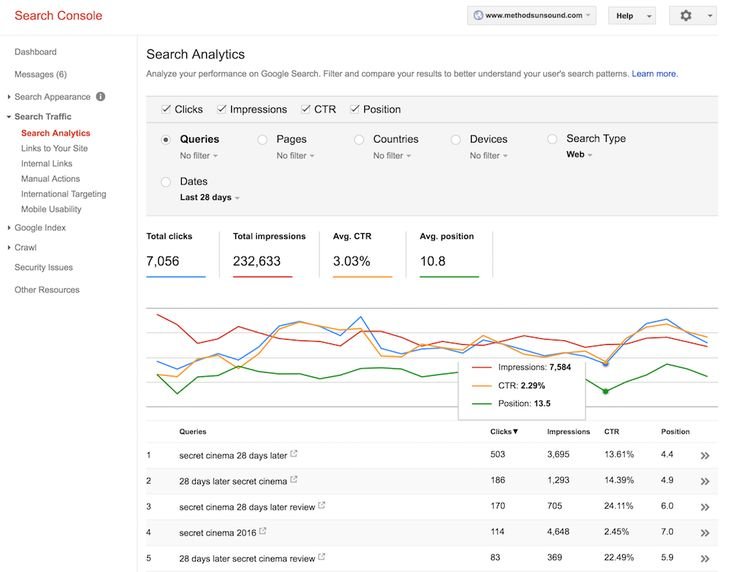
- Go to Performance to check clicks, impressions, CTR, average position, and search queries.
- Use URL Inspection to check whether a specific page is indexed.
- If a new page isn’t indexed, use Request Indexing.
- Check Page Indexing to find pages that Google couldn’t index.
- Check Core Web Vitals to identify page experience and performance issues.
- Regularly monitor Search Console and fix important errors.
Simple formula:
Add Website → Verify → Submit Sitemap → Check Indexing → Monitor Performance → Fix Issues → Improve SEO.
After setting up Search Console, the most useful routine is to check indexing and performance reports in a simple weekly workflow so you can catch problems early and improve your SEO consistently.